
JGrid Tutorial #5

#Swing

In this tutorial we want to take a deeper look at cell rendering. In the last tutorials we already implemented GridCellRenderer and set them as default renderer to the JGrid. This is exactly the same behavior as renderer in a JList. But if you have different data types in a grid only one renderer won´t fulfill the requirements. For this purpose you can add different GridCellRenderer to the JGrid. Like in a JTable you can add renderers for different data classes to the JGrid.
Let´s say we have colors and percentages in our model:
Random random = new Random();

for(int i=0; i if(random.nextBoolean()) {
  model.addElement(new Color(random.nextInt(256), random.nextInt(256), random.nextInt(256)));
} else {
  model.addElement(new Float(random.nextFloat()));
}

grid.setModel(model);
To visualize the color values we can use the renderer from the previous tutorial. For the new percentage values we need a different renderer:
  private static final long serialVersionUID = 1L;

  private float f = 0.0f;

  public GridPercentCellRenderer() {
    setHorizontalAlignment(SwingConstants.CENTER);
    setBackground(Color.white);
    setForeground(Color.black);
  }

  @Override
  public Component getGridCellRendererComponent(JGrid grid, Object value, int index, boolean isSelected, boolean cellHasFocus) {
    if(value != null && value instanceof Float) {
      this.f = ((Float) value).floatValue();
      setText(NumberFormat.getPercentInstance().format(f));
    }
    return this;
  }

  @Override
  protected void paintComponent(Graphics g) {
    g.setColor(getBackground());
    g.fillRect(0, 0, getWidth(), getHeight());
    g.setColor(Color.LIGHT_GRAY);
    int height = (int)((float)getHeight() * f);
    g.fillRect(0, getHeight() - height, getWidth(), height);
    super.paintComponent(g);
  }
}
Until now all tutorials used the setDefaultRenderer(...) methode to set a special design to the grid. Just now we have a problem using this practice: we need renderers for different data types. In the JGrid this is as simple as in the JTable.
Here we go:
grid.getCellRendererManager().addRendererMapping(Float.class, new GridPercentCellRenderer());
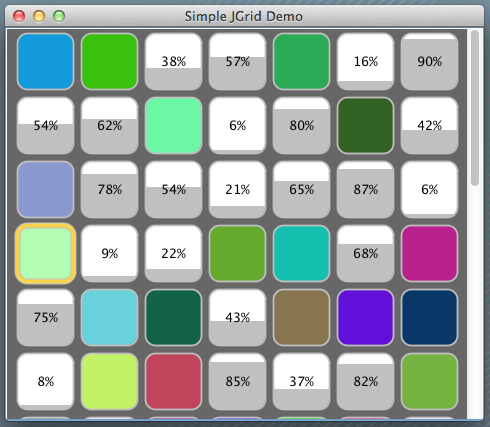
Here you can see the effect:
You can download the source file here.